inkdna PDF fingerprint API documentation
These docs explain how to add low-visibility forensic grid watermarking to PDF downloads, connect inkdna with WooCommerce, attach order tokens to download links, verify leaked files, and use the detection API for attribution workflows.
Where to start
→ New here? You're in the right place — follow the steps below.
→ Using WooCommerce? Switch to the
WooCommerce tab.
→ Need a full HTML walkthrough? See the
Integration tab.
→ Testing or debugging? Try
Verify & API or
Troubleshooting.
Integrity Check (Free Tool)
Analyze whether a document has been modified after distribution and whether its origin remains recoverable.
The InkDNA Integrity Tool is a local analysis utility that evaluates structural consistency within a document. It detects signs of post-distribution modification by identifying local inconsistencies in texture, edges, and compression patterns. It also estimates whether attribution remains feasible after transformations such as re-encoding, screenshots, or partial degradation.
InkDNA proves origin. The Integrity Tool shows whether that origin survived.
Runs locally. No account required.
Designed for
- Evaluating whether a distributed file has been altered.
- Understanding how transformations affect attribution.
- Testing robustness of fingerprinted documents.
- Academic exploration of document integrity.
Not designed for
- Preventing copying or redistribution.
- Guaranteeing detection under extreme transformations.
- Acting as DRM or access control.
- Replacing the core InkDNA verification pipeline.
Quick start (any site)
- Claim your key at
/claim.html. - Add your domain on the claim page.
-
Paste the loader on your site (near the end of
<body>on pages with download links):
<script src="https://inkdnafingerprint.com/plugin.js"
  data-key="pk_XXXX"
  data-observe='a[href*=".pdf" i],a[data-inkdna]'
  data-mode="loose" async></script>
- See the Integration tab for a full setup walkthrough including order IDs.
Other platforms
The CDN loader works on any platform that allows script
injection.
We focus on the loader and WooCommerce integration. Reach out for
custom setups.
WooCommerce Plugin
- In your WordPress admin, go to Plugins → Add New.
-
Search for
InkDNA Fingerprinted Downloadsand click Install Now, then Activate. -
Set
API BaseandAPI Keyunder WooCommerce → Settings → InkDNA. - All digital downloads are stamped automatically using the Woo order number.
API keys are available on the landing page. The plugin simplifies integration — no manual order ID wiring needed.
Setup walkthrough — screenshots
Click any screenshot to enlarge. Use ← / → to navigate, Esc to close.
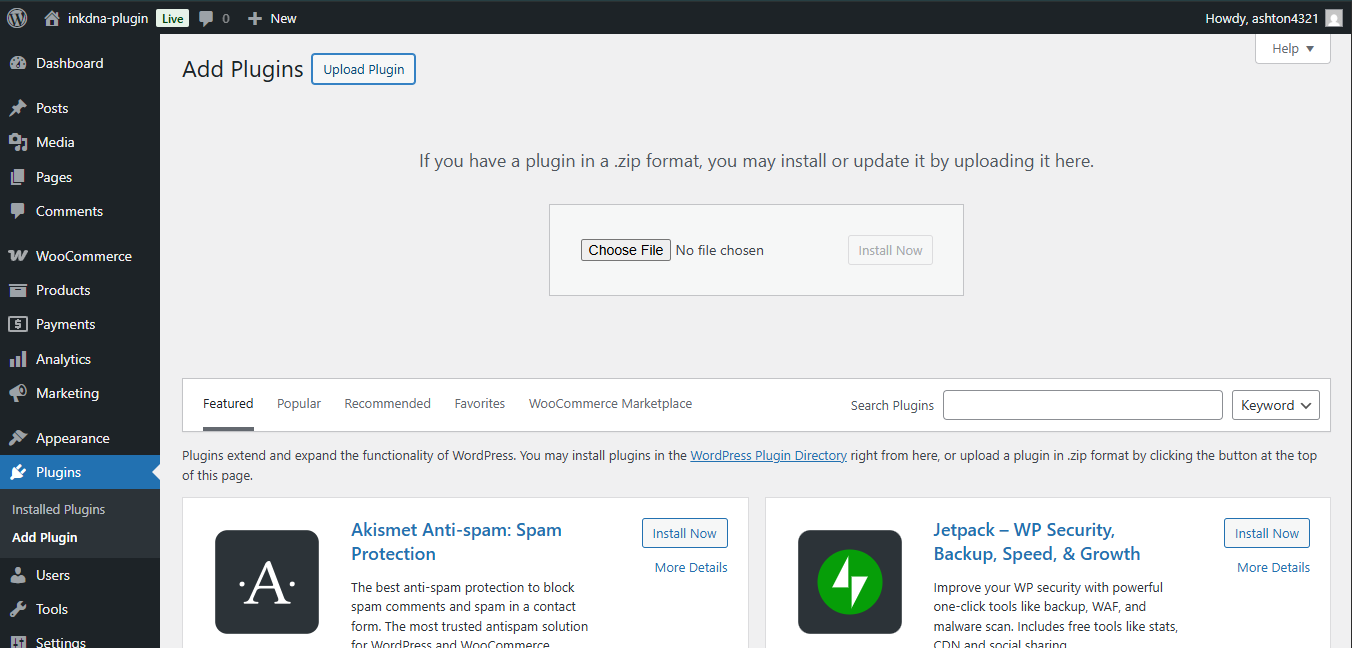
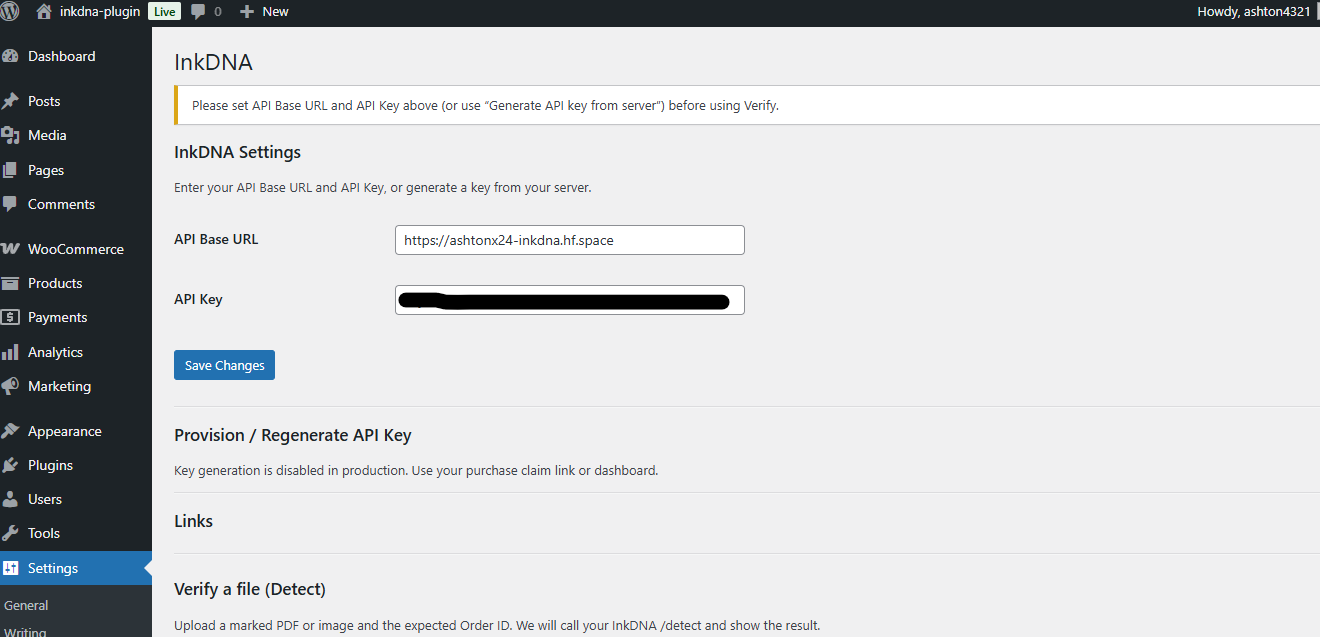

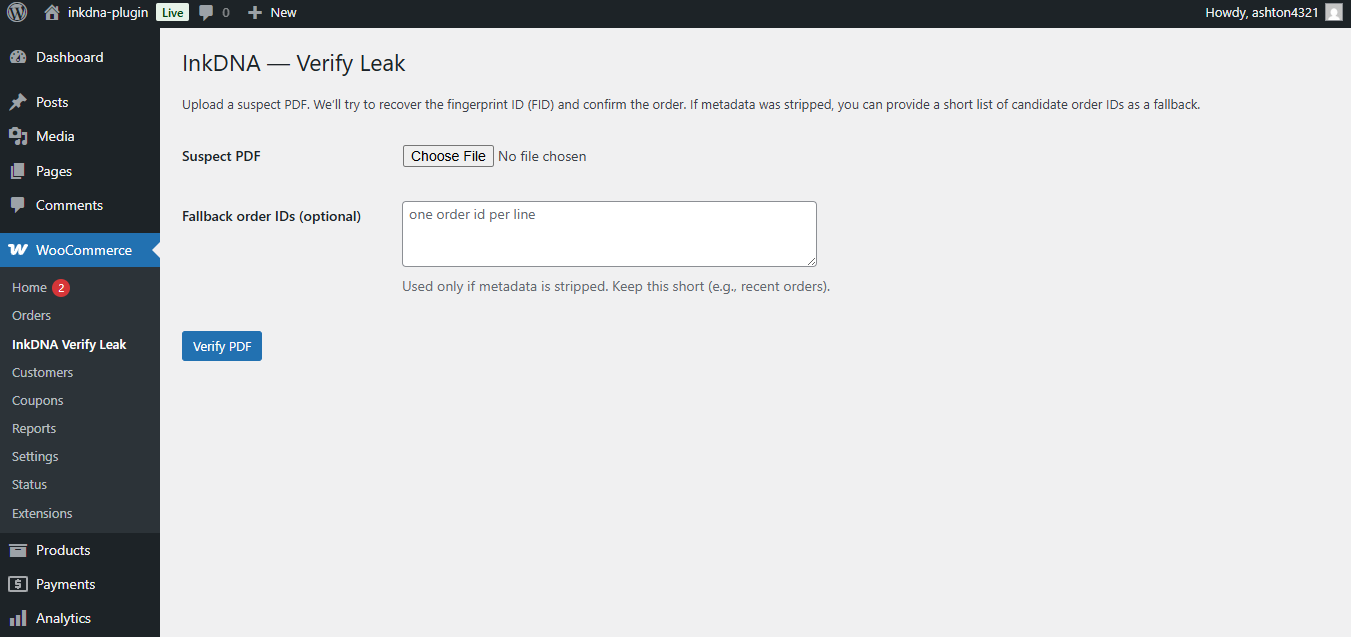
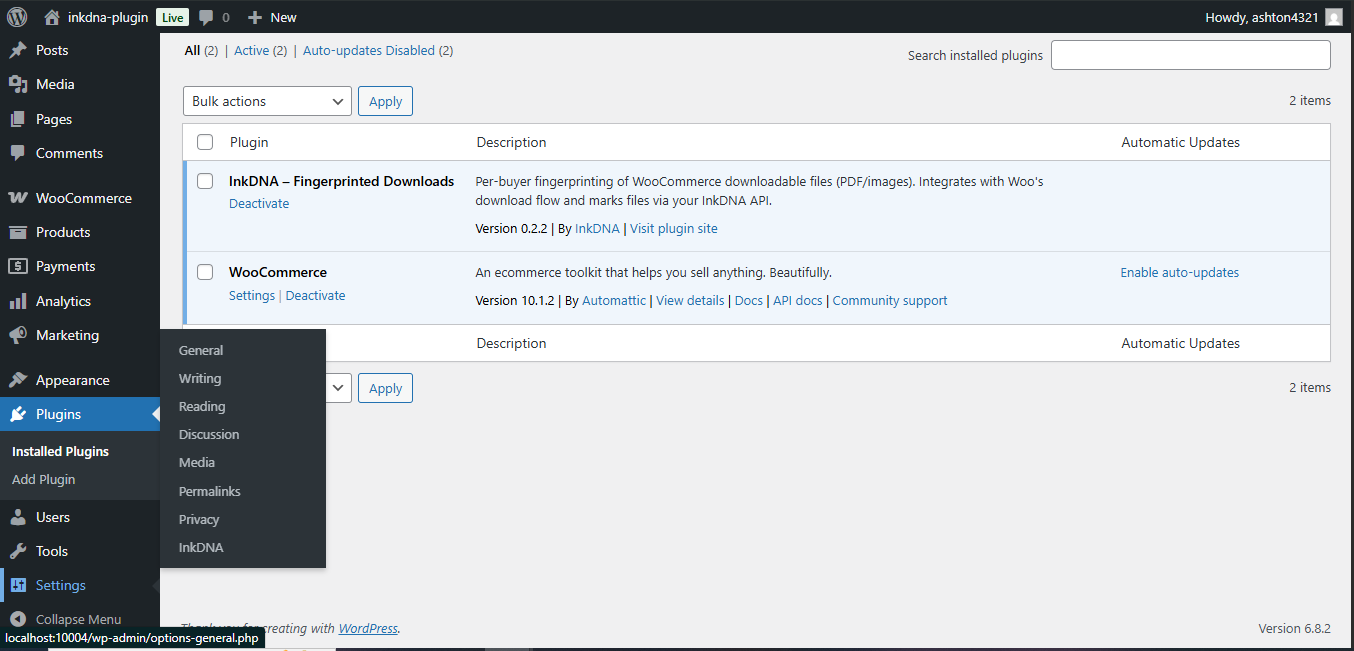
Exact HTML you can drop onto a site that serves downloadable PDFs. Shows the loader, a sample download link, and ways to pass an order token when files are stamped.
1 Include the loader
Place this near the end of your <body> on pages
that host download links.
<script src="https://inkdnafingerprint.com/plugin.js"
  data-api="https://ashtonx24-inkdna.hf.space"
  data-key="pk_XXXX"
  data-observe='a[href*=".pdf" i],a[data-inkdna]'
  data-mode="loose" async></script>
Note: the loader requires both
data-api and data-key to run. If either is
missing the loader will warn in the console and will not run —
useful for a non-live demo page.
2 Your download link
Add data-inkdna to your normal PDF anchor and — ideally
— a per-order token via data-inkdna-order:
<a href="/assets/sample.pdf" data-inkdna data-inkdna-order="ORDER-123">Download your PDF</a>When clicked, the loader sends the asset and the detected order token (if present) to your inkdna API to request a stamped PDF.
3 How to pass an Order ID (pick ONE)
⚠️ What if no order token is found?
The loader does not generate order IDs. If none is found, the server may issue an internal token. For strongest attribution, always pass a server-generated order ID tied to your PDF.
a) Explicit attribute — recommended, works anywhere
Add the order token directly to the link:
<a href="/assets/sample.pdf" data-inkdna data-inkdna-order="ORDER-123">Download</a>b) URL parameter — no HTML changes needed
If your platform already appends an order id in the download URL, the loader will detect these query keys:
/assets/sample.pdf?order=ORDER-123
/assets/sample.pdf?order_id=ORDER-123
/assets/sample.pdf?order-received=ORDER-123
Recognized keys: order, order_id,
order-received, oid.
c) Page hint — auto-share one order to all links
On thank-you or order-complete pages, add this small snippet. It finds common order elements or query params and copies the value into all PDF links so the loader can pick it up.
<script>(function(){
  var el = document.querySelector('#orderNo, .order-number, [data-order-number]');
  var ord = el ? (el.textContent || el.value || '').trim() : '';
  if (!ord) {
    var q = new URLSearchParams(location.search);
    ord = q.get('order') || q.get('order_id') || q.get('order-received') || q.get('oid') || '';
  }
  if (ord) {
    document.body.dataset.inkdnaOrder = ord;
    document.querySelectorAll('a[href*=".pdf" i],a[data-inkdna]').forEach(function(a){
      a.dataset.inkdnaOrder = ord;
    });
  }
})();</script>
This snippet is intentionally minimal and safe — it only reads
visible page content and query params and writes a
data-inkdna-order attribute to anchors. It does not
access any backend or sensitive data.
On custom thank-you pages
<script>(function(){
  var p=new URLSearchParams(location.search);
  var ord=p.get('order-received')||p.get('order')||'';
  if(ord) document.body.dataset.inkdnaOrder=ord;
})();</script>
4 Notes & best practices
-
Server-rendered tokens are best:
the most defensible evidence comes from tokens your backend
injects into the checkout/thank-you page (e.g.
data-inkdna-order="{{ORDER_TOKEN}}"). - Do not place PII in attributes: avoid embedding emails, full names or raw personal data in public attributes or in PDFs. Use opaque tokens the server maps to real orders.
-
Loader requirements:
the loader requires both
data-api(your API base) anddata-key(public key prefix). If either is missing the loader will not run.
If you use WooCommerce, the plugin automates order mapping on the thank-you page — see the WooCommerce tab for visual steps.
🔍 Verification — Verify Page or API
For structural analysis of modified files, see the Integrity Tool.
- For regular users, the easiest and most trusted method is the Verify page — upload a suspect PDF and verify its origin through direct or queued verification.
- Developers can use the API endpoints below for automated verification and analysis.
Public demo (safe to try)
Use this demo key on Verify to check our stamped sample.
demo_live_d12KIiDxdoLLScgy9Suexow3m9oFAAwS
Download BEFORE.pdf Download AFTER.pdf Open Verify
This key only works on AFTER.pdf and cannot mark.
Stamped files include a faint forensic grid that slightly darkens pages; reading remains normal. Optional canary text (a small visible footer) may be enabled in sandbox/demo to confirm stamping; verification does not depend on it. It will be demolished post beta.
Terminal / curl
# Detect (Immediate)
curl -H "X-API-Key: YOUR_API_KEY" \
     -H "X-Order-Id: ORDER-12345" \
     -F file=@suspect.pdf \
     https://your-api.example/detect

# Example response
{
  "decision":"confirmed",
  "confidence":1.0,
  "order_id":"ORD-DOC01"
}

# Submit (Queued)
curl -H "X-API-Key: YOUR_API_KEY" \
     -F file=@suspect.pdf \
     https://your-api.example/detect/submit

# Example response
{
  "job_id":"...",
  "status":"queued",
  "result_token":"...",
  "status_url":"...",
  "result_url":"..."
}Queued Verification Workflow
Submit returns immediately with a job ID and private URLs. Poll the status URL until the job completes, then fetch the result URL.
Submit PDF
    ↓
POST /detect/submit
    ↓
status_url
    ↓
queued → running → complete
    ↓
GET result_url
    ↓
verification result
Check Job Status
curl \
"https://ashtonx24-inkdna.hf.space/detect/jobs/JOB_ID?token=TOKEN"
Returns the current job state:
queued, running, complete, or
failed.
Fetch Result
curl \
"https://ashtonx24-inkdna.hf.space/detect/result/JOB_ID?token=TOKEN"
Once the job is complete, fetch the final verification result using the result URL.
Advanced: Poll until completion (Linux/macOS)
STATUS_URL="https://ashtonx24-inkdna.hf.space/detect/jobs/JOB_ID?token=TOKEN"

while true; do
  curl -s "$STATUS_URL"
  echo
  sleep 2
done
Continuously polls the job status every 2 seconds. Stop with Ctrl+C.
Result URL Expiry
Status and result URLs remain valid for approximately 4 hours. After expiry, submit a new verification job.
These URLs act as private bearer links. Anyone possessing the URL and token can access the verification result. Treat them as temporary private links.
Verification Cost
- Detect: 1 op
- Submit (Guess mode): 1 op
- Submit (Identify mode): 3 ops
Submit automatically selects the appropriate verification path. The returned result includes the mode used.
Advanced: You can optionally include a layout
reference header X-Ref-Q (Base64 URL-safe) when calling
any of the endpoints above. It supplies a pre-computed layout
signature vector for additional layout-similarity evidence. This is
optional and not required for normal verification.
API used by the loader
POST /claim
-
Body:
{ publicKey, asset, context: { orderId?, referer, userAgent? } } - Returns:
{ token, expiresAt, policy }
GET /fp?token=…
-
Streams the stamped PDF, or
202+Retry-Afterif still rendering.
FAQ — Verification
Do I need to pass an order ID?
No.
-
/detectverifies against a known order ID and returns a result immediately. -
/detect/submitcreates a queued verification job and does not require an order ID.
Use Detect when the original order is known. Otherwise use Submit.
Do screenshots or images work?
Not reliably yet. The production verifier is designed for PDFs.
Standalone screenshots and page images may be accepted by the API
intake layer, but current raster-only attribution is experimental
and should not be relied on for source identification.
Summary:
Use /detect when the original order ID is known. Use
/detect/submit when attribution must be determined
automatically. Submit returns private status and result URLs that
remain valid for approximately 4 hours.
🛠 Troubleshooting
-
Download didn't change? Set
data-mode="loose"for testing; switch to"strict"once stable. -
Origin blocked on
/claim? Add your domain on the claim page. -
Order ID missing? Use
data-inkdna-orderor the auto-page-hint snippet — see the Integration tab. -
Verification still running?
If you used Submit, poll the returned
status_urluntil the job reachescomplete, then fetch theresult_url.
Questions about order IDs, metadata-stripped files, or screenshot verification? See the Verify & API tab — the full FAQ and curl examples live there.